Best Prebuilt Gaming PC 2027: Which One Should You Buy?
Choosing the right Best Prebuilt gaming PC can be harder than it looks. With so many options, it’s easy to spend more money than you need—or choose a system that doesn’t give you the gaming performance you want. So, what is the best prebuilt gaming PC for 2027?
In this guide, we’re comparing five of the best prebuilt gaming PCs across different price ranges and performance levels. Whether you mainly play competitive games at 1080p, want smooth 1440p gaming, or need serious power for demanding 4K games, there’s a pick here worth considering. We’ll look at real gaming performance, graphics power, RAM, storage, upgrade options, and overall value.
We’ll also point out one honest downside for each PC, so you can make a smarter buying decision. By the end, you’ll have a much clearer idea of which prebuilt gaming PC is right for your games, budget, and setup
Table of Contents

5. Thermaltake LCGS Quartz i1460.
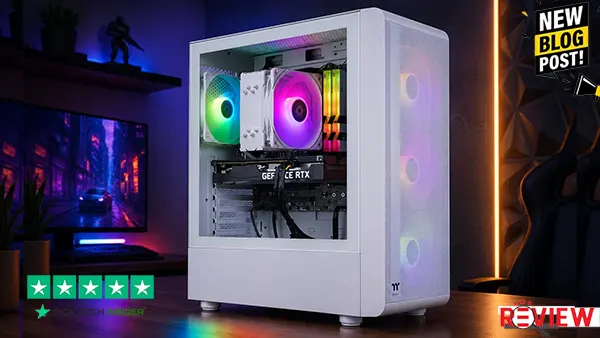
If you want an easy entry into PC gaming without building a computer yourself, the Thermaltake LCGS Quartz i1460 is a practical place to start. With the RTX 5060 and Core i5-14400F, it’s aimed mainly at 1080p gaming, making it a good fit for players coming from an older PC or console. The 1TB NVMe storage also gives you a good amount of room for your games, while the white case and RGB lighting make the setup look clean on a desk. Customer feedback also highlights the simple setup, solid gaming performance, and good value for the money.
Reasons to Buy
- Great starting point for 1080p gaming
- Easy plug-and-play setup
- 1TB NVMe storage
- Clean white design with RGB lighting
- Good choice for first-time PC gamers
Reasons to Avoid
The biggest weakness is the 16GB of DDR4 memory. It’s still usable for gaming, but it gives you less room for heavy multitasking and future upgrades. Some buyers have also reported issues with the rear I/O shield alignment, so quality control may be worth checking when your PC arrives.
For me, this is a solid entry-level pick if you want simple 1080p gaming without building a PC yourself.
4. CyberPowerPC Gamer Master.
If you want a prebuilt gaming PC that feels like a real step up from a basic starter system, the CyberPowerPC Gamer Master is worth a look. The Ryzen 7 8700F and RTX 5060 Ti make it a strong fit for high-refresh 1080p gaming, while it can also handle 1440p gaming with sensible settings. It’s best for gamers who want smooth everyday performance, easy setup, and a newer platform without building a PC themselves. Buyer feedback is generally positive, with customers often mentioning simple setup, good gaming performance, and solid value.
Reasons to Buy
- Strong choice for high-refresh 1080p gaming
- Capable 1440p performance
- Easy setup for first-time PC buyers
- 16GB DDR5 and fast SSD storage
- Good fit for gaming, streaming, and everyday multitasking
- Upgrade-friendly design compared with many prebuilts
Reasons to Avoid
The biggest thing to watch is the RTX 5060 Ti’s 8GB of VRAM. It’s fine for 1080p and sensible 1440p settings, but demanding games with heavy textures can put more pressure on that memory. Some buyers have also reported occasional Wi-Fi or setup issues, so it’s worth testing everything when the PC arrives.
For me, this is a strong choice if you want smooth 1080p gaming with enough power to step into 1440p.
3. MSI Codex Z2.
If you’re ready to move beyond 1080p and want a prebuilt gaming PC that feels comfortable at 1440p, the MSI Codex Z2 is a strong middle-ground choice. The RTX 5070, 32GB of DDR5 memory, and 2TB SSD give you plenty of room for demanding games, a large game library, and everyday multitasking. It’s best for serious gamers who want high-refresh 1440p gaming without jumping all the way into a premium 4K system. Reviews from buyers also commonly mention fast performance, easy setup, smooth gaming, and good graphics.
Reasons to Buy
- Strong choice for 1440p gaming
- 32GB RAM gives you plenty of breathing room
- 2TB storage means more space for large games
- RTX 5070 provides plenty of graphics power
- Good fit for gaming, streaming, and everyday work
- Easy option if you don’t want to build a PC yourself
Reasons to Avoid
The main thing to consider is the cooling and overall noise under heavier workloads. The air-cooled setup can become noticeable when the PC is working hard. Also, customer experiences aren’t completely consistent, with some buyers reporting setup or hardware issues, so it’s worth checking everything carefully when the PC arrives.
For me, this is the sweet spot in the list if your main goal is smooth 1440p gaming with plenty of room to grow.
2. Lenovo Legion Tower 5i.
If your goal is smooth 1440p gaming with the option to step into 4K, the Lenovo Legion Tower 5i is a serious upgrade. The RTX 5070 Ti with 16GB of VRAM and 32GB of DDR5 gives you plenty of room for demanding games, high settings, and heavy multitasking. It’s best for gamers who want strong performance now without feeling like they need to replace the PC anytime soon. Reviews also praise its gaming performance, cooling, and overall build quality.
Reasons to Buy
- Excellent fit for high-refresh 1440p gaming
- Capable of handling 4K gaming
- 32GB of RAM is plenty for gaming and multitasking
- 16GB of VRAM gives the GPU more room for demanding games
- Solid cooling and a clean, understated design
- Good choice if you want a powerful prebuilt without building one yourself
Reasons to Avoid
The biggest weakness is the 1TB SSD. Modern games can take up a lot of space, so you may find yourself uninstalling games sooner than you’d like or adding more storage later. Vivid Repairs
For me, this is the pick to consider if smooth 1440p gaming and long-term performance matter more than having a huge amount of storage.
1. Corsair Vengeance A7500.
If you want a high-end prebuilt gaming PC and your main goal is serious gaming performance, the Corsair Vengeance A7500 is the strongest pick on this list. With the Ryzen 7 9800X3D and RTX 5080, it’s built for demanding games, high settings, and 4K gaming. The 32GB of DDR5 and 2TB SSD also give you plenty of room for a large game library and everyday multitasking. Independent reviews found its gaming performance impressive, while users have praised the system’s looks, setup, and overall experience.
Reasons to Buy
- Excellent choice for demanding 4K gaming
- Ryzen 7 9800X3D is especially focused on gaming performance
- RTX 5080 gives you plenty of graphics power
- 32GB RAM and 2TB storage are a strong combination
- Premium-looking case and liquid cooling
- Good option if you want a powerful prebuilt without building one yourself
Reasons to Avoid
The biggest problem is the price. You’re paying a premium for this level of performance, and similar hardware can sometimes be found for less from other builders. Also, while many owners report a positive experience, there are customer reports of individual systems arriving with startup or hardware issues, so it’s important to test everything carefully when your PC arrives.
For me, this is the best pick here if you have the budget and want a premium prebuilt focused on high-end gaming performance.
How to Choose the Right Prebuilt Gaming PC
Choosing the right prebuilt gaming PC is not just about picking the most expensive model or the biggest numbers on the product page. The best choice depends on the games you play, your target resolution, your budget, and how long you want the PC to last. Before buying, focus on these four important areas.
1. Choose the Right GPU for Your Gaming
The graphics card is one of the most important parts of a gaming PC because it has a major impact on gaming performance. If you mainly play competitive games at 1080p, you may not need an expensive high-end GPU. For 1440p or demanding 4K games, you’ll want a more powerful graphics card. Start by choosing the performance level you actually need instead of paying for power you may never use.
2. Check RAM and Storage
For a modern gaming PC, 16GB of RAM is a good starting point, while 32GB can be a better choice if you stream, multitask, or want more room for future games. Storage matters too. An NVMe SSD makes loading and everyday use much faster than an old hard drive, and 1TB gives you more breathing room for large modern games.
3. Don’t Ignore Cooling and the Power Supply
A powerful gaming PC needs proper cooling and a reliable power supply. Good airflow helps the system handle long gaming sessions, while the power supply needs to safely support the hardware. Don’t choose a PC based only on its CPU and GPU while ignoring these less exciting parts. They can make a big difference in the overall experience and long-term reliability.
4. Think About Upgrades Before You Buy
Finally, look at the upgrade path. A larger case and accessible components can make future upgrades easier, especially if you plan to add more storage or memory later. Also check the warranty and exactly which components are included, because some prebuilt PCs can use less obvious parts that are harder to replace. A good prebuilt should give you the performance you need today while leaving you reasonable room to improve it later.
Final Verdict
Choosing the best prebuilt gaming PC really comes down to your games, budget, and the resolution you want to play at. If you mainly play at 1080p and want a simple starting point, the Thermaltake LCGS Quartz i1460 is a practical choice. For a stronger 1080p setup, the CyberPowerPC Gamer Master gives you more performance.
If 1440p gaming is your main goal, the MSI Codex Z2 offers a great balance of performance, memory, and storage. The Lenovo Legion Tower 5i is a better fit if you want more graphics power and the option to move toward 4K.
But if budget isn’t your biggest concern and you want serious high-end gaming performance, the Corsair Vengeance A7500 is our top pick. Its powerful hardware, 32GB of RAM, and 2TB of storage make it a strong choice for demanding games and long-term use.
Before buying, always check the latest price and the exact configuration, because prebuilt PC specifications and pricing can change. Ultimately, the best gaming PC is the one that gives you the performance you actually need without making you pay for hardware you won’t use.
Frequently Asked Questions
1. What is the most important part of a Best prebuilt gaming PC?
For gaming, the GPU is one of the most important parts to check first. It has a major effect on graphics quality and frame rates, especially when you move from 1080p to 1440p or 4K gaming. Choose the GPU based on the games and resolution you actually plan to use rather than simply buying the most expensive option.
2. How much RAM do I need for a gaming PC?
For a modern gaming PC, 16GB of RAM is a good starting point. If you regularly stream, keep many apps open, or do other demanding tasks while gaming, 32GB can give you more room. RAM is also one of the easier components to upgrade later on many desktop PCs.
3. Is a prebuilt gaming PC worth buying?
Yes, especially if you want a gaming PC without dealing with the time and complexity of choosing and installing every component yourself. A prebuilt PC comes assembled and usually includes the operating system and manufacturer support. The trade-off is that you have less control over individual parts compared with building your own PC.
4. Is 1TB SSD storage enough for a gaming PC?
1TB can be a good starting point, but it depends on how many games you want installed at once. Modern games can take up a lot of space, so a larger SSD can be useful if you have a big game library. An SSD is also preferable to an older HDD as your main drive because it provides faster loading and system response.
5. Should I buy a 1080p, 1440p, or 4K gaming PC?
Choose based on the monitor and gaming experience you want. 1080p is easier to run and usually needs less powerful hardware. 1440p offers a sharper image while still being a popular performance target. 4K requires significantly more graphics power, so you’ll generally need a higher-end GPU. The key is to match the PC to your target resolution instead of paying for performance you won’t use.

Hridoy Taqi
CEO & Founder at HridoyTaqi
Hridoy is a strategic problem solver who drives growth and revenue through innovative SEO and digital marketing strategies. With over 2 years of experience…..