Best Windows Laptops of 2026
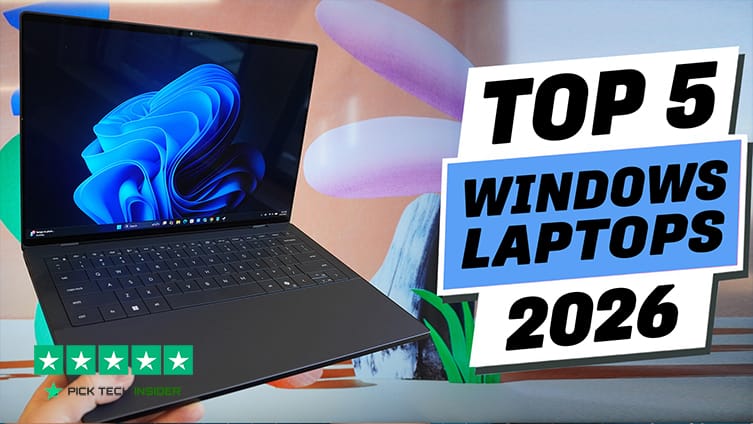
What’s up, guys? Today, we’re taking a look at the Top 5 Best Windows Laptops of 2026. If you’re planning to buy a new laptop this year, choosing the right one isn’t as easy as it used to be. With so many models offering powerful processors, AI features, high-refresh-rate displays, and longer battery life, it’s easy to spend more money than you need—or end up with a laptop that doesn’t really fit the way you work or play. That’s exactly why we put this list together.
In today’s guide, we’ll count down our five favorite Windows laptops of the year, covering everything from portable everyday machines and value-focused picks to premium productivity laptops and powerful gaming systems. We’ll talk about what each laptop does well, where it falls short, and who it’s really designed for, so you can choose with confidence.
Whether you’re a student, a professional, a creator, or someone who simply wants a reliable laptop for everyday use, there’s something here for you. So sit back, and let’s get started with our countdown of the Top 5 Best Windows Laptops of 2026.
5 Best Windows Laptops of 2026
Table of Contents
5. ASUS Zenbook Duo
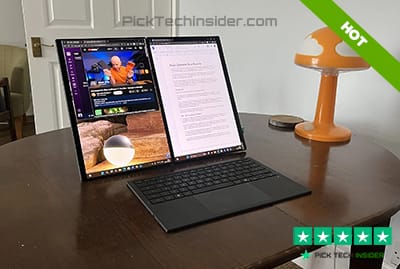
If your workday usually involves dozens of browser tabs, documents, video calls, or creative apps, the ASUS Zenbook Duo offers something most laptops simply can’t—a true dual-screen experience. The second OLED display isn’t just a cool feature; it genuinely makes multitasking easier. You can keep your main project on one screen while your notes, chat, or reference material stays open on the other, without needing an external monitor.
The displays look fantastic, typing feels comfortable with the detachable keyboard, and everyday performance is fast enough for work, studying, and content creation. The biggest downside is that using both screens drains the battery faster, and the complete setup is a little heavier than a typical ultrabook.
Reasons to Buy:
- Dual OLED displays make multitasking much easier.
- Great choice for writers, programmers, designers, and creators.
- Flexible design works in laptop, desktop, and dual-screen modes.
- Bright, colorful displays with a premium build quality.
Reasons to Avoid:
- Battery life drops when both displays stay active.
- The dual-screen design isn’t necessary for basic everyday users.
My Verdict: If multitasking is part of your daily routine, the Zenbook Duo is one of the most unique and useful Windows laptops you can buy. But if you just need a simple laptop for everyday tasks, there are better values higher on this list.
4. ASUS ROG Zephyrus G14
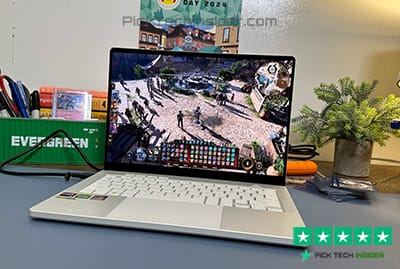
If you want one laptop that can handle work during the day and gaming at night, the ASUS ROG Zephyrus G14 is one of the best choices around. What makes it stand out is how much power it packs into such a compact and premium design. It feels more like a high-end everyday laptop than a bulky gaming machine, yet it’s powerful enough for modern games, video editing, coding, and creative work.
The keyboard is comfortable, the OLED display looks fantastic, and it’s easy to carry whether you’re heading to class, the office, or a coffee shop. The only real downside is that it gets warm during long gaming sessions, and battery life drops quickly when you’re pushing the hardware.
Reasons to Buy:
- Excellent balance of gaming, productivity, and portability.
- Premium aluminum build with a bright, color-rich OLED display.
- Great for gamers, creators, students, and professionals who need one machine for everything.
- Comfortable keyboard and one of the better trackpads in a gaming laptop.
Reasons to Avoid:
- Runs warm and fans become noticeable under heavy gaming.
- Premium price compared to many gaming laptops.
My Verdict: If you want a Windows laptop that feels just as good for everyday work as it does for gaming, the Zephyrus G14 is one of the easiest recommendations on this list—and we’re only getting started.
3. Samsung Galaxy Book6 Ultra
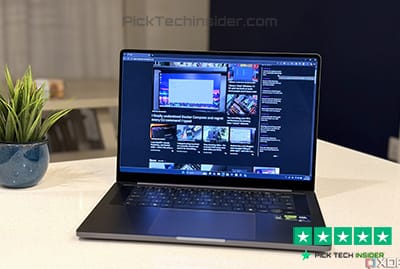
If you’re already using a Samsung phone or tablet, the Galaxy Book6 Ultra feels like a natural extension of your setup. You can move files between devices, copy and paste across screens, and even answer phone notifications without breaking your workflow.
But even without the Samsung extras, this is a premium Windows laptop with an outstanding AMOLED display, strong battery life, and plenty of performance for photo editing, video projects, programming, and everyday multitasking.
It feels solid, looks sleek, and stays comfortable to use throughout a busy day. The biggest drawback is the price—it sits firmly in the premium category, so it’s harder to recommend if you won’t use its extra ecosystem features.
Reasons to Buy:
- Beautiful AMOLED display that’s great for work, movies, and creative projects.
- Excellent build quality with a slim, premium design.
- Strong performance for productivity, editing, and multitasking.
- Fantastic choice if you already use other Samsung Galaxy devices.
Reasons to Avoid:
- Premium price compared with many competing Windows laptops.
My Verdict: If you’re invested in the Samsung ecosystem, the Galaxy Book6 Ultra is one of the smoothest Windows laptop experiences you can get. Even on its own, it’s an excellent premium laptop—but the next two picks deliver even better overall value.
2. Lenovo IdeaPad Slim 3x
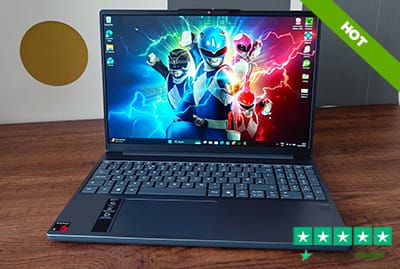
If you’re looking for the best value Windows laptop of the year, the Lenovo IdeaPad Slim 3x is incredibly hard to ignore. It’s built for people who spend most of their day browsing the web, working in Microsoft Office, attending video meetings, streaming content, or studying.
Thanks to its Snapdragon processor, it stays cool, runs silently without a fan, wakes up almost instantly, and delivers battery life that easily lasts through a full work or school day.
It also feels surprisingly light and comfortable to carry around. The only thing to keep in mind is that it’s an ARM-based Windows laptop, so a few older desktop apps and some games may not run perfectly. For everyday users, though, that’s rarely a deal-breaker.
Reasons to Buy:
- Outstanding all-day battery life with excellent power efficiency.
- Quiet, fanless design that’s perfect for libraries, classrooms, and offices.
- Lightweight and easy to carry for work, school, or travel.
- Great value for students, remote workers, and anyone who mainly uses web apps and everyday Windows programs.
Reasons to Avoid:
- Some older Windows software and certain games still have compatibility limitations on ARM.
- Not designed for demanding video editing, 3D work, or high-end gaming.
My Verdict: If your priority is long battery life, everyday speed, and getting the most for your money, the IdeaPad Slim 3x is one of the smartest Windows laptop buys of 2026. But one laptop still manages to deliver the most complete overall experience.
1. Dell XPS 14
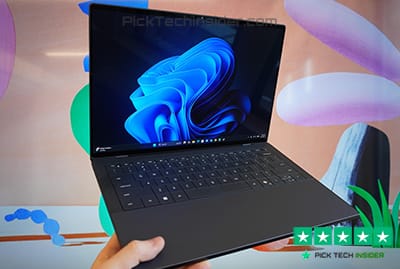
If you want one Windows laptop that does almost everything exceptionally well, the Dell XPS 14 is the one to beat. It combines premium build quality, excellent everyday performance, a beautiful OLED display, and long battery life into a package that feels just as polished as it looks.
Whether you’re working with large spreadsheets, editing photos and videos, writing code, or simply streaming your favorite shows, the XPS 14 stays fast, quiet, and comfortable throughout the day.
The keyboard feels great for long typing sessions, the touchpad is smooth and responsive, and the aluminum chassis gives it a truly premium feel. The biggest downside is the price, and like many thin premium laptops, you’ll probably need a USB-C hub if you regularly use older accessories.
Recent reviews also praise Dell for improving the keyboard, battery life, and overall design compared with previous generations.
Reasons to Buy:
- Premium aluminum design that feels durable and high-end.
- Excellent balance of performance, battery life, and portability.
- Gorgeous OLED display that’s perfect for work, entertainment, and creative projects.
- Great choice for professionals, students, creators, and anyone wanting one laptop for everything.
- Comfortable keyboard, responsive touchpad, and impressive speakers make everyday use enjoyable.
Reasons to Avoid:
- One of the most expensive laptops on this list.
My Verdict: If I could choose only one Windows laptop from this list, the Dell XPS 14 would be my pick. It’s the most complete all-around machine of 2026 and an easy recommendation for anyone who wants a premium Windows experience without major compromises.
Final Thoughts
That wraps up our list of the Top 5 Best Windows Laptops of 2026. Whether you’re looking for a powerful all-around laptop, a gaming machine, an ultra-portable work companion, or the best value for your money, there’s a great option on this list for every type of user. The best choice really comes down to how you plan to use your laptop every day.
If you found this guide helpful, be sure to check the links in the description for the latest prices and availability, since deals can change over time. And if you’ve already used one of these laptops—or you think there’s another Windows laptop that deserves a spot on this list—let everyone know in the comments below.
If you enjoyed this video, don’t forget to leave a like and subscribe for more honest buyer’s guides, in-depth reviews, and the latest tech recommendations. Thanks for watching, and we’ll see you in the next one!
How to Choose the Right Windows Laptop in 2026
Buying a new Windows laptop isn’t just about choosing the fastest processor or the biggest screen. The best laptop is the one that matches the way you work, study, create, or play every day. Before you spend your money, here are the four most important things to consider.
Start With How You’ll Use It
The first question to ask is simple: What will you use your laptop for?
- Everyday use: Web browsing, email, Microsoft Office, streaming, and video calls.
- Students: Lightweight design, long battery life, and a comfortable keyboard.
- Content creators: A color-accurate display, powerful CPU, dedicated GPU, and at least 16GB RAM.
- Gamers: A dedicated graphics card, fast display, and strong cooling system.
- Business users: Reliable battery life, good webcam, quality keyboard, and durable build.
Choosing a laptop based on your daily tasks is far more important than chasing the highest specifications.
Don’t Ignore the Core Hardware
A laptop’s performance depends on a few key components.
- Processor (CPU): Intel Core Ultra, AMD Ryzen AI, and Qualcomm Snapdragon X processors are excellent choices for most buyers.
- Memory (RAM): 16GB is the sweet spot for smooth multitasking. While 8GB is enough for light use, 16GB provides better long-term value.
- Storage: A 512GB SSD offers the best balance of speed and space. If you work with large files, consider 1TB.
Focus on Battery Life and Display Quality
You’ll spend hours looking at your screen, so display quality matters just as much as performance.
Look for:
- Full HD or higher resolution
- IPS or OLED panel for better colors and viewing angles
- Brightness of at least 300 nits for comfortable indoor use
- Refresh rates above 60Hz if you game or enjoy smoother scrolling
Battery life is equally important. If you’re often away from an outlet, choose a laptop that can comfortably last 10–12 hours or more on everyday tasks. ARM-based Windows laptops can often deliver even longer battery life.
Check the Little Things Before Buying
Small details can make a big difference over years of ownership.
Before purchasing, make sure the laptop has:
- A comfortable keyboard and responsive touchpad
- The ports you actually need, such as USB-C, HDMI, or USB-A
- A quality webcam if you attend online meetings
- Solid build quality and dependable customer support
- Wi-Fi 6E or Wi-Fi 7 for faster wireless connectivity
These everyday features often matter more than a small performance upgrade you’ll rarely notice.
Frequently Asked Questions
Which Windows laptop is best for most people in 2026?
For most users, the Dell XPS 14 is one of the best all-around Windows laptops in 2026. It offers an excellent balance of performance, battery life, portability, and premium build quality. It’s suitable for students, professionals, creators, and anyone looking for a reliable laptop that can handle everyday tasks as well as more demanding workloads.
How much RAM do I need in a Windows laptop?
For everyday tasks like web browsing, office work, and streaming, 16GB of RAM is the recommended choice in 2026. It provides smooth multitasking and better long-term performance. While 8GB can still handle basic use, users who edit photos, create videos, or run multiple applications at once will benefit from 16GB or more.
Should I buy an Intel, AMD, or Snapdragon Windows laptop?
It depends on how you use your laptop.
1. Intel Core Ultra laptops are great for productivity, creative work, and overall performance.
2. AMD Ryzen AI laptops offer excellent multitasking, gaming, and strong value.
3. Snapdragon X Series laptops deliver outstanding battery life, silent operation, and AI-powered features, making them ideal for everyday productivity. However, some older Windows applications may still have compatibility limitations on ARM-based systems.
Is an OLED display worth it on a laptop?
Yes—especially if you watch movies, edit photos, create content, or simply want the best viewing experience. OLED displays provide deeper blacks, richer colors, and higher contrast than traditional LCD panels. The only trade-offs are that OLED laptops often cost more, and displaying static images for very long periods may increase the risk of image retention over time.
How long should a good Windows laptop last?
A quality Windows laptop typically lasts 5 to 7 years with proper care. Choosing a model with a modern processor, 16GB or more of RAM, and an SSD helps keep the system fast and capable as software requirements increase. Regular updates, battery care, and routine maintenance can also extend the laptop’s lifespan.
What is the best Windows laptop for students in 2026?
Students should look for a laptop that offers a lightweight design, reliable performance, and long battery life. Models like the Lenovo IdeaPad Slim 3x are excellent for note-taking, online classes, web browsing, and Microsoft Office, while premium options like the Dell XPS 14 provide extra power for engineering, design, or programming students.
Are Windows laptops good for gaming?
Yes. Many Windows laptops are built specifically for gaming. If you play modern AAA games or competitive esports titles, look for a laptop with a dedicated NVIDIA GeForce RTX graphics card, a fast refresh-rate display, and an efficient cooling system. The ASUS ROG Zephyrus G14 is a great example of a laptop that balances gaming performance with everyday productivity.
Is a Windows laptop better than a MacBook?
Neither is better for everyone—it depends on your needs. Windows laptops offer more variety, better gaming support, easier hardware upgrades on some models, and a wider range of prices. MacBooks are known for excellent battery life and tight integration with the Apple ecosystem. If you need flexibility, gaming, or specialized Windows software, a Windows laptop is often the better choice.
How much storage do I need on a laptop?
For most people, 512GB SSD storage is the ideal choice. It provides enough space for Windows, everyday applications, photos, and documents. If you edit videos, work with large files, or install many games, consider a 1TB SSD for extra storage and better long-term flexibility.
Should I buy a laptop with AI features?
Yes, if you’re buying a new laptop in 2026. Modern AI-powered processors can improve battery efficiency, enhance video calls with background blur and noise reduction, and speed up certain creative and productivity tasks. Even if you don’t use AI tools today, these features help make your laptop more future-ready.
What screen size is best for a Windows laptop?
The ideal screen size depends on how you use your laptop.
13–14 inches: Best for travel and portability.
15–16 inches: Great balance between workspace and mobility.
17 inches or larger: Ideal for gaming, video editing, and desktop replacement use.
A 14-inch laptop is often considered the best all-around option for most users.
Is 16GB RAM enough in 2026?
Yes. For most users, 16GB of RAM is the sweet spot in 2026. It handles multitasking, web browsing, office work, photo editing, programming, and even light video editing without issues. Professionals working with large video projects or 3D rendering may benefit from 32GB or more.
How important is battery life when choosing a laptop?
Battery life is one of the most important factors to consider. A laptop that lasts 10–14 hours on a single charge allows you to work, study, or travel without constantly searching for a power outlet. Real-world battery life often varies depending on brightness, workload, and the applications you’re running.
How often should I replace my Windows laptop?
Most quality Windows laptops remain reliable for five to seven years. If your laptop becomes noticeably slow, no longer receives software support, struggles with your daily tasks, or the battery no longer lasts long enough, it may be time to upgrade.
Final Buying Tip
Don’t choose a laptop simply because it’s the most expensive or has the highest specifications. The best Windows laptop is the one that matches your daily workflow, budget, and future needs. Spending a little time comparing your options now can save you money and help you enjoy a better computing experience for years to come.

Hridoy Taqi
CEO & Founder at HridoyTaqi
Hridoy is a strategic problem solver who drives growth and revenue through innovative SEO and digital marketing strategies. With over 2 years of experience…..